Use an external cloud provided SMTP server
These days abusing SMTP servers provided by cloud providers for phishing/spam has become more strict due to the recent constant abuse by malicious actors.
I will be detailing Gmail SMTP as the cloud SMTP example here, it’s on you to find another provider for better delivery that suit your needs.
Setting up GMails external SMTP
GMails SMTP details are as follows:
- Gmail SMTP server address:
SMTP.gmail.com - Gmail SMTP name:
Your full name - Gmail SMTP username:
Your full Gmail address (e.g. you@gmail.com) - Gmail SMTP password:
The password that you use to log in to Gmail - Gmail SMTP port (TLS):
587 - Gmail SMTP port (SSL):
465
Visit https://myaccount.google.com/lesssecureapps and enable “Less secure app access” to your gmail account.
Setting up GMails SMTP with GoPhish:
- Login to your GoPhish server –> Sending Profiles –> New Profile.
- Setup the config as detailed in the start.
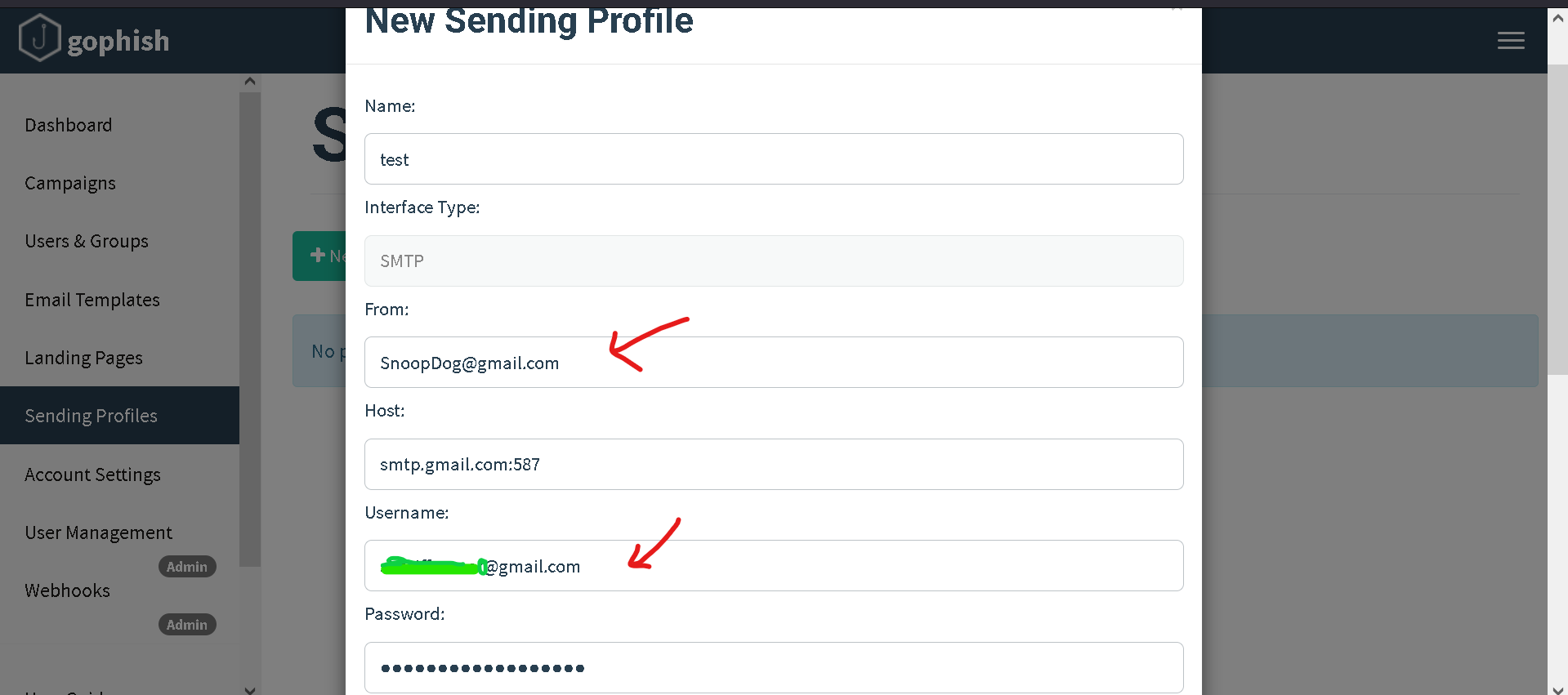
- Test the email.


- It isn’t possible to spoof using simple header spoofing that gophish offers, in this case (GMail) we’d have to make a thoughtful gmail account such as:
facebook-support24_7@gmail.com.
Inference
- The mails should land bypassing the spam filter into the primary inbox most times with delivery depending on the cloud provider. In this case it would be 100% since GMails delivery would be so.
- GMail and most other cloud providers offer roughly around 300 mails or so on a daily basis for free. Plans with payment can be used to upgrade and improve the number of mails sent per day.