Engaging and pentesting SMTP Relays & Servers

Index
Introduction
Some basic SMTP Commands:
  HELO: It’s the very first SMTP welcome command to start the conversation and identifying the sender server and is followed by its domain name.

  EHLO: Same like HELO command or An alternative command to start the conversation, underlying that the server is using the Extended SMTP protocol.

  EMAIL: FROM: The sender states the source email address in the “From” field and starts the email transfer.

  RCPT: TO: It identifies the recipient of the email.

  DATA: Sending your body of mail by the DATA command the email content begins to be transferred.

  VRFY: The server is asked to verify whether a particular email address or username exists.

  AUTH: Authentication command, the client authenticates itself to the server, giving its username and password.

  HELP: client’s request for some information that can be useful for the successful transfer of the email.

  EXPN: asks for confirmation about the identification of a mailing list.

  RSET: Client communicates the server to stop the ongoing email transmission or terminating the continuous mail from the server.

  ETRN: or TURN changes roles between the client and the server.Client will be acting as SMTP Server.

  QUIT: It terminates the SMTP conversation.
A workflow of an email´s travel from one user to another would look like so: MUA → MSA → MTA → internet → MTA → MDA → MUA
A “relay” SMTP system receives mail from an SMTP client and transmits it, without modification to the message data other than adding trace information, to another SMTP server for further relaying or for delivery.
Attacking an SMTP-Server
Various Scenarious
- Someone connects to your SMTP-server and wants to send from an account on your domain to another on your domain. This is the “normal” case that one would assume to happen on a daily basis. Hence it is rare nbut absolutely abusable if credentials are available.
- Someone connects to your SMTP-server and wants to send from your domain to an external domain. I would consider this to be at least unusual, as no one from your organisation will directly transfer their emails to the firewall under normal circumstances. Hence it is not as abusable.
- Someone connects to your SMTP-server and wants to send from an external domain to an external domain. This would be considered an open mail-relay if allowed and you don´t want that to happen, unless you like yourself to be put on all the blacklists for spammers out there. Hence it is higly Abusable and dangerous.
Pentesting port 25,465,587
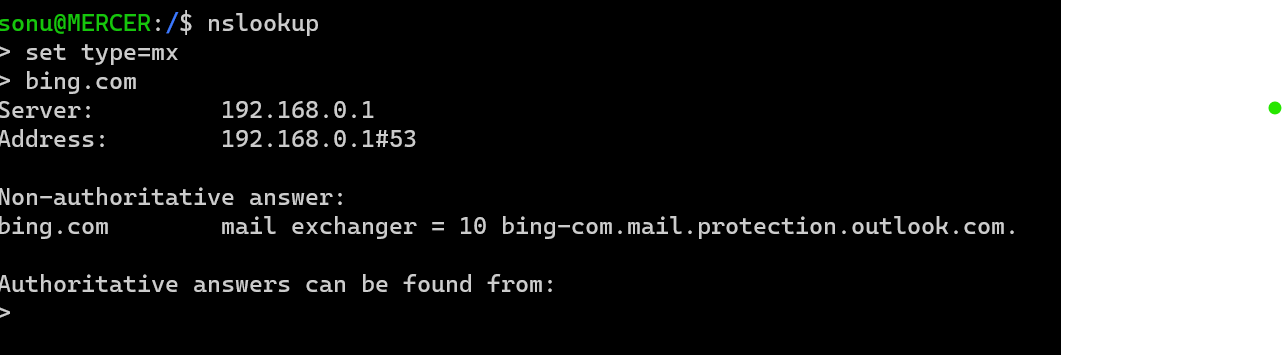
Using a simple nslookup for the MX records:
  nslookup
  set type=mx
  example.com
The result yields systems responsible for incoming mail for that domain.
Next we perform a basic nmap scan, to identify open ports: Namely seeking ports - 25,465,587.
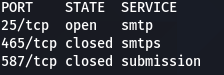
Now based on what ports are open we can perform the following:
- Connecting/Pentesting Port 25:
- Mailserver User Enumeration: use the
VRFY/EXPNSMTP Command:telnet 10.0.0.1 25 Trying 10.0.0.1... Connected to 10.0.0.1. Escape character is '^]'. 220 myhost ESMTP Sendmail 8.9.3 HELO 501 HELO requires domain address HELO x 250 myhost Hello [10.0.0.99], pleased to meet you VRFY boobman 250 Super-User <boobman@myhost> VRFY blah 550 blah... User unknowntelnet 10.0.10.1 25 Trying 10.0.10.1... Connected to 10.0.10.1. Escape character is '^]'. 220 myhost ESMTP Sendmail 8.9.3 HELO 501 HELO requires domain address HELO x EXPN test 550 5.1.1 test... User unknown EXPN root 250 2.1.5 <ed.williams@myhost> EXPN sshd 250 2.1.5 sshd privsep <sshd@mail2> - Sending email:
- Use the SMTP Commands
MAIL FROMandRCPT TOto send the forged mail to the receiver using:- Syntax for sender:
mail from:kingkong@example.com - Syntax for receiver:
rcpt to:tarzan@example.com - Utilize the SMTP command
DATAto compose the mail in the command line.
- Syntax for sender:
- Use the SMTP Commands
Pentesting SPF,DKIM,DMARK
Use mailspoof to check for SPF and DMARC misconfigurations.
Traditionally it was possible to spoof any domain name that didn’t have a correct/any SPF record. Nowadays, if email comes from a domain without a valid SPF record is probably going to be rejected/marked as untrusted automatically and hence most have all the checks - SPF,DMARC,DKIM at play making abusable attacks like open relays less common unless certaing misconfigurations come at play.
An email spoofing testing tool that aims to bypass SPF/DKIM/DMARC and forge DKIM signatures using espoofer.
Attacking an Exchange Server
Exchange is basically a mail server that supports a bunch of Microsoft protocols. It’s usually located on subdomains named autodiscover, mx, owa or mail, and it can also be detected by existing /owa/, /ews/, /ecp/, /oab/, /autodiscover/, /Microsoft-Server-ActiveSync/, /rpc/, /powershell/ endpoints on the web server.
The currently supported server versions are 2007, 2010, 2013 and 2016.
Office 365 and Outlook.com are built on top of Exchange. Consequently, any attack we could perform against an Exchange server, can be also performed against an Office365 or Outlook.com profile.
I’d recommended reading through this already well written blog by h4ms1k detailing how to attack MS Exchange Servers from a Red Team’s perspective.
Conclusion
If configured unsafe, SMTP-servers can put your company at a high risk. You neither want external parties to send emails from your domain to your domain without authentication, nor do you want your SMTP-server to act as an open mail-relay.
Make use of the security mechanisms that are available to protect your environment(SPF,DKIM,DMARC,SSL/TLS) as much as possible.